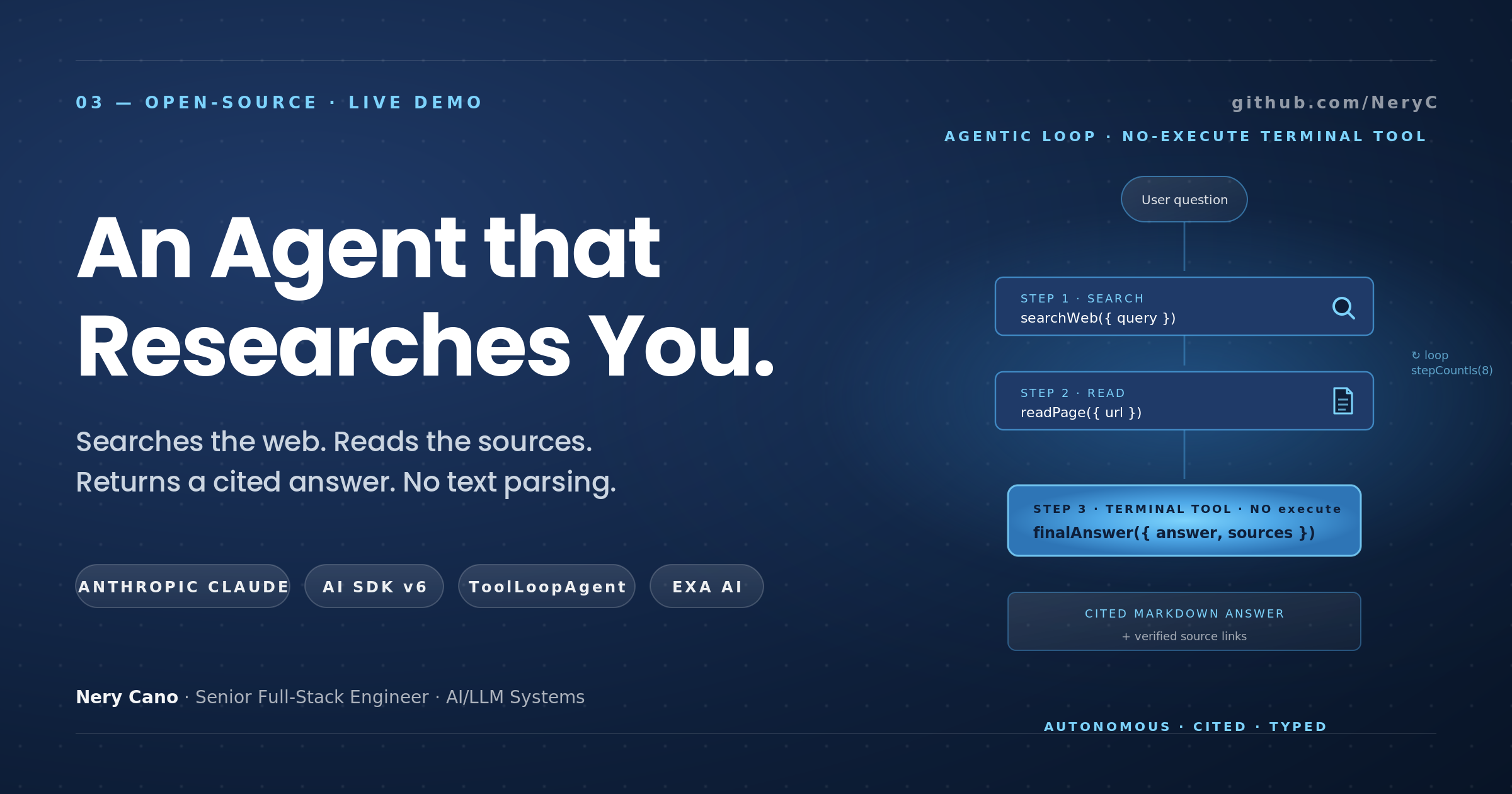
Why ToolLoopAgent + a no-execute finalAnswer tool replaced 80 lines of brittle while-loop code in my research agent.
Every blog post I read about "autonomous LLM agents" in 2024 had roughly the same shape:
let messages = initialMessages;
for (let i = 0; i < MAX_STEPS; i++) {
  const result = await streamText({ model, messages, tools });
  messages = [...messages, ...result.responseMessages];

  if (result.text.includes('FINAL ANSWER')) break;
  if (result.finishReason === 'stop' && !result.toolCalls.length) break;
  // ...maybe other heuristics...
}

const finalText = parseFinalAnswer(messages);
This works. I shipped variants of it for over a year. But every time I came back to one of these loops six months later to fix something, I would find myself re-deriving:
- When does this loop actually stop?
- How does the parser distinguish "I'm done" from "I'm thinking out loud"?
- What happens if the model hallucinates the magic phrase mid-thought?
- Why is my final-answer extraction a regex over the last assistant message?
Then in early 2026 I built a research agent on top of Vercel AI SDK v6's ToolLoopAgent and a tiny pattern clicked into place that made all of those questions go away.
The pattern is: define your "I'm done" signal as a tool with no execute function.
That sentence sounds boring. Stay with me — it's the cleanest agentic-loop trick I've seen.
🔗 github.com/NeryC/research-agent · live demo
The agent I built
The use case was a familiar one: an LLM that takes a research question, searches the web, reads pages, and synthesizes a cited Markdown answer. Three tools:
searchWeb({ query })— calls Exa's/searchendpoint, returns 5 results with title, URL, and pre-extracted highlights.readPage({ url })— calls Exa's/contents, returns up to 8,000 characters of clean page text.finalAnswer({ answer, sources })— emits the final response to the user, with citations.
The model decides which tool to call, in what order, and when to stop. It can search, read a page, search again with refined terms, read another page, and finally produce its answer. Up to 8 steps total.
The pattern: a terminal tool that doesn't execute
In AI SDK v6, every tool is defined with tool() and a Zod input schema. Most tools also have an execute function that actually does the work:
export const searchWebTool = tool({
  description: 'Search the web for relevant pages on a topic.',
  inputSchema: z.object({
    query: z.string().describe('The search query'),
  }),
  execute: async ({ query }) => {
    const results = await searchExa(query, 5);
    return results.map(r => ({ title: r.title, url: r.url, highlights: r.highlights }));
  },
});
Now look at finalAnswer:
export const finalAnswerTool = tool({
  description: 'Submit the final answer to the user with structured citations.',
  inputSchema: z.object({
    answer: z.string(),
    sources: z.array(z.object({
      url: z.url(),
      title: z.string(),
      snippet: z.string().optional(),
    })),
  }),
  // ← intentionally no execute
});
No execute. Just a schema.
Inside ToolLoopAgent, the SDK sees that this tool has no executor. When the model decides to call it, the loop stops immediately. The tool's call is the result. The validated, fully typed payload ({ answer, sources }) is what gets returned to your code.
export const researchAgent = new ToolLoopAgent({
  model: claude-sonnet-4.6,
  instructions: SYSTEM_PROMPT,
  tools: {
    searchWeb: searchWebTool,
    readPage: readPageTool,
    finalAnswer: finalAnswerTool,
  },
  stopWhen: stepCountIs(8),
});
That's the whole agent.
No while. No for. No "did the model say it's done?" parsing. No regex over the response text. The model gets to decide between "search," "read," and "finish" using the same mechanism it uses for the other tools, and the loop terminates the moment it picks "finish."
Why this is better than the old pattern
Three reasons it stuck for me:
1. Termination is structural, not heuristic
In the old pattern, "when do we stop?" is decided by what the model says. You might match on the literal string "FINAL ANSWER" or check that the model's last message has no tool calls. Both are heuristics. They fail when the model rephrases, when it thinks out loud, when it does both — call a tool and output some prose that looks like a final answer.
In the no-execute pattern, "when do we stop?" is decided by which function the model calls. There is no string to parse. The decision lives in the model's tool-call output, which is a structured field, not free text.
2. The output is fully typed
When the loop stops, you get the finalAnswer tool's input — already parsed, already validated against the Zod schema. There is no separate "extract the final answer" step.
const result = await researchAgent.stream({ messages });
// result.finalToolCall.args is typed as { answer: string, sources: Source[] }
Compare to the old pattern, where you'd have to scan messages for the tag, slice out the JSON, parse it, and handle the case where the model wrote prose instead of JSON.
3. The agent loop is declarative
ToolLoopAgent({ model, tools, stopWhen }) reads as a complete description of what the agent does. There's no hidden loop body, no scattered exit conditions, no edge-case handling spread across helper functions. If I come back to this code a year from now, I'll know exactly what it does in five seconds.
What stepCountIs(8) means
stopWhen: stepCountIs(8) is the safety net. If the model never calls finalAnswer (e.g. it gets stuck in a search loop), the SDK will halt the agent after 8 tool-call iterations. This caps both compute cost and the risk of infinite loops.
For the research agent, 8 steps is plenty. A typical session:
Step 1: searchWeb({ query: "Vercel AI Gateway vs LiteLLM" })   → 5 results
Step 2: readPage({ url: "https://vercel.com/.../ai-gateway" }) → 8000 chars
Step 3: searchWeb({ query: "LiteLLM features pricing 2024" })  → 5 results
Step 4: readPage({ url: "https://docs.litellm.ai/..." })       → 8000 chars
Step 5: finalAnswer({ answer: "...", sources: [...] })         → loop terminates
If the question is harder, the model uses more steps. If it bottoms out, the cap saves you.
A few practical extras
Streaming the agent's reasoning to the browser
ToolLoopAgent.stream() returns a UI Message Stream that AI SDK v6's useChat hook consumes natively:
// Server side — Route Handler
export async function POST(req: Request) {
  const { messages }: { messages: UIMessage[] } = await req.json();

  const result = await researchAgent.stream({
    messages: await convertToModelMessages(messages),
  });

  return result.toUIMessageStreamResponse();
}
// Client side
const { messages, sendMessage } = useChat({
  transport: new DefaultChatTransport({ api: '/api/research' }),
});
Each tool call streams to the browser as it happens — searchWeb start → searchWeb result → readPage start → … — and the UI renders a card for each one in real time. No polling, no manual SSE plumbing on the client; the hook handles it.
Vercel AI Gateway over the direct Anthropic SDK
I route the model call through Vercel AI Gateway instead of using the Anthropic SDK directly. Three reasons:
- One API key for everything. I can swap from
claude-sonnet-4.6toclaude-haiku-4.5togpt-5by changing a string. No new key management. - Automatic provider failover. If Anthropic has an outage, the Gateway re-routes to Bedrock or Vertex without me touching anything.
- Cost dashboard. Every request is logged with cost, latency, and token usage. Useful when you're trying to figure out which agent is burning your budget.
The model constant lives in lib/agent/model.ts:
export const RESEARCH_MODEL = 'anthropic/claude-sonnet-4.6';
That's it. The Gateway picks it up from the AI_GATEWAY_API_KEY env var.
Why Exa instead of Google/Bing
I don't strictly need a search engine — I could parse Google's HTML or use a SerpAPI-style proxy. But Exa returns clean text content directly, no raw HTML, no anti-bot resistance, no JavaScript-heavy pages. For an LLM that needs to read content, this is a huge time-saver. The whole lib/exa.ts file is ~50 lines.
Rate limiting per IP
The agent makes a Sonnet call per step plus an Exa call per searchWeb/readPage. That gets expensive fast on a public demo. I use a simple in-memory Map<string, Bucket> rate limiter keyed by IP, capped at 5 queries per IP per hour. For a portfolio demo this is sufficient; in production you'd swap to Upstash Redis so the limit is global across instances.
export function rateLimit(key: string, opts: { max: number; windowMs: number }) {
  const now = Date.now();
  const existing = buckets.get(key);
  if (!existing || existing.resetAt <= now) {
    buckets.set(key, { count: 1, resetAt: now + opts.windowMs });
    return { allowed: true, remaining: opts.max - 1 };
  }
  if (existing.count >= opts.max) return { allowed: false };
  existing.count += 1;
  return { allowed: true };
}
What I learned
Three takeaways I'll carry into every future agent:
- Make termination structural. If your loop's exit condition is "the model said the magic phrase," you have a brittle agent. Make it a tool call instead. The model still gets to decide; you get a clean signal and a typed payload.
- Lean on
ToolLoopAgent(or the equivalent in your framework) instead of hand-rolling loops. A declarative agent definition is easier to read, easier to debug, and easier to hand off to a teammate. The bespokewhileloop is almost never worth its cost. - Schemas everywhere. Same lesson as my multi-agent code reviewer post: the schema is the contract. Once you internalize that LLM outputs should be validated typed data, not free-form text, every agent you build gets cleaner.
The whole research agent — UI, server route, agent definition, three tools, rate limiter, 14 tests — fits in roughly 700 lines of TypeScript. The README walks through every file. Steal it for your own project.
🔗 github.com/NeryC/research-agent
🔗 Live demo: research-agent-three-pi.vercel.app